
QR Codes on Packaging: When They Work and When They Don’t

By
••
7 min read
•Understanding Packaging
Most QR codes on packaging never get scanned. Not because the technology doesn’t work — because the destination isn’t worth the scan, or the code was placed where the print couldn’t support it.
Before adding one to your artwork, the question isn’t whether QR codes are useful. It’s whether yours will be.
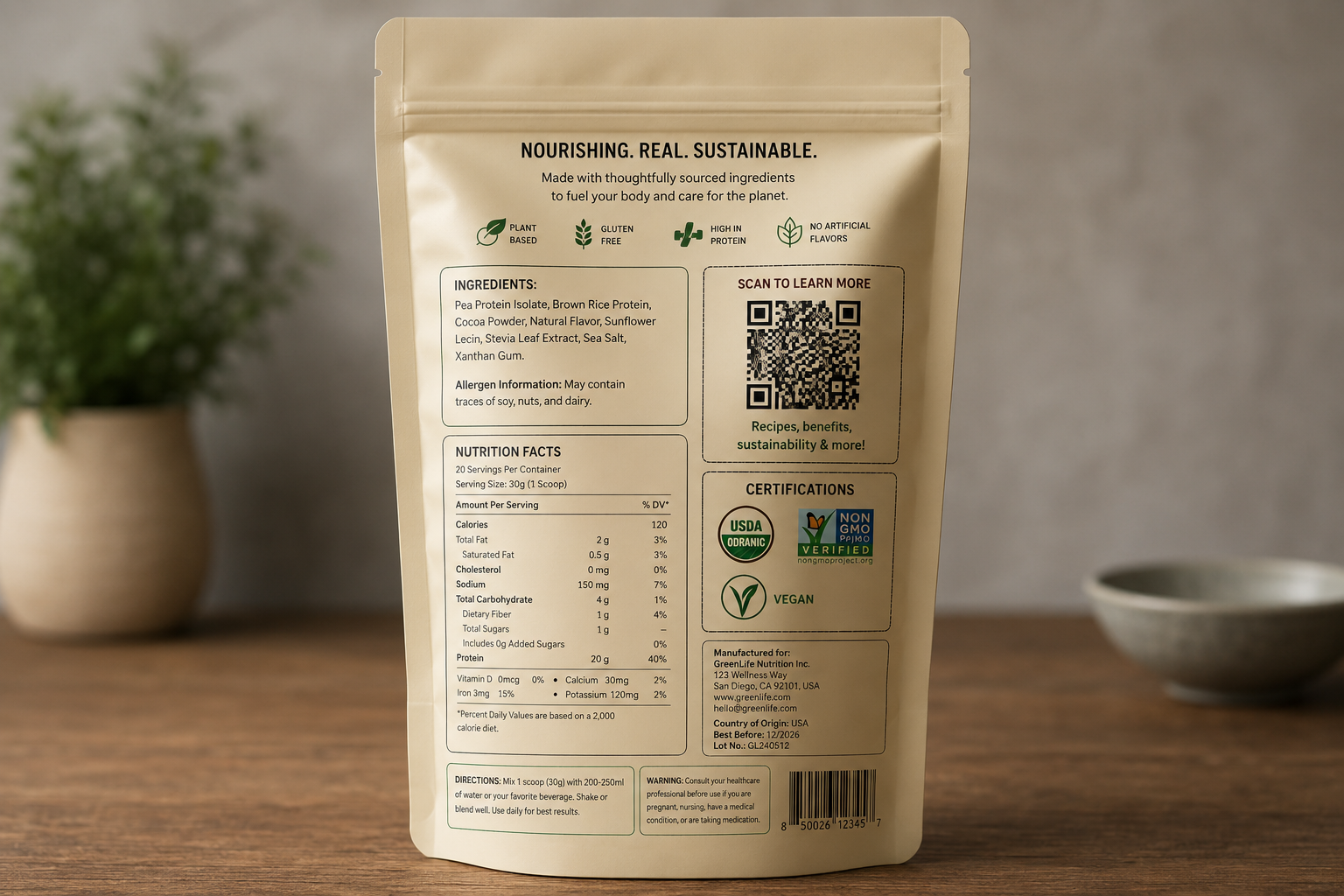
When a QR Code Actually Earns Its Place
A QR code on packaging works when it solves a specific problem that the physical surface can’t — not when it’s added because it looks modern or because a competitor has one.
The use cases that reliably generate real scans share one thing: the destination delivers something the customer can’t get any other way at that moment. Recipe content on a food pouch, accessed while the customer is cooking. A compliance document for a cannabis product, required by regulation in certain states. A tutorial video for a product with a non-obvious application method. A warranty or batch registration that benefits the customer to complete.
These work because the scan has a reason. The customer picks up the product, wants the information, and the code is the fastest path to it. Outside of these cases — and a handful of others — scan rates on consumer packaging are typically under 5%. The majority of codes printed on packaging are never used.
A code that links to a brand’s homepage, a generic product listing page, or a social media feed will not be scanned at meaningful rates. The customer already knows how to find you if they want to. The code needs to do something the package surface itself can’t do.
When a QR Code Doesn’t Belong
Two problems account for most QR code failures on packaging: the destination isn’t worth the scan, and the format doesn’t have room for the code to function.
On the destination side: a QR code that resolves to a broken URL, a non-mobile-optimised page, or a generic homepage does active damage. The customer who scans and gets nothing, or gets a page that doesn’t load cleanly on a phone, walks away with a worse impression of the brand than if the code hadn’t been there. Print is permanent; the impression lasts the life of the packaging.
On the format side: a QR code needs a minimum quiet zone of 2cm × 2cm on the final printed surface to scan reliably across typical smartphone cameras. That’s a meaningful area on a small format. On a 2oz label, a pre-roll tube, or a compact pouch panel, that 2cm × 2cm footprint competes directly with regulatory text, ingredient declarations, allergen warnings, net weight, and certification marks — all of which are mandatory. Something has to give. Brands typically discover this trade-off at the dieline review stage, which is late. The time to check it is before the artwork is briefed.
Static vs Dynamic: The Decision You Need to Make Before You Print
If you’ve decided a QR code belongs on your packaging, the next question is whether it should be static or dynamic. This matters more than most brands realise, because changing your mind after printing isn’t possible.
A static QR code encodes a fixed URL directly into the code itself. It costs nothing to generate, has no ongoing dependency on a third-party platform, and will work for as long as the destination URL remains live. The problem is that if the destination changes — and this happens more often than founders expect, during rebrands, platform migrations, or domain changes — every printed unit with that code becomes a dead link. There is no way to update a static code after printing.
A dynamic QR code routes through a short URL managed by a third-party platform. The short URL stays the same; the destination behind it can be updated at any time without reprinting. This makes dynamic codes the right choice for any brand that expects to update the destination during the life of the print run. The trade-off is cost: dynamic code platforms typically run $5–$50 per month depending on feature set, and you’re adding a dependency on that platform staying operational. If the platform goes down or you cancel the subscription, the code stops working.
The practical rule: if the destination URL is stable and unlikely to change within two to three years, a static code is fine. If there’s any meaningful chance the destination will change — due to a rebrand, a new website, a seasonal campaign, or a platform switch — use a dynamic code and build the subscription cost into your packaging budget from the start.
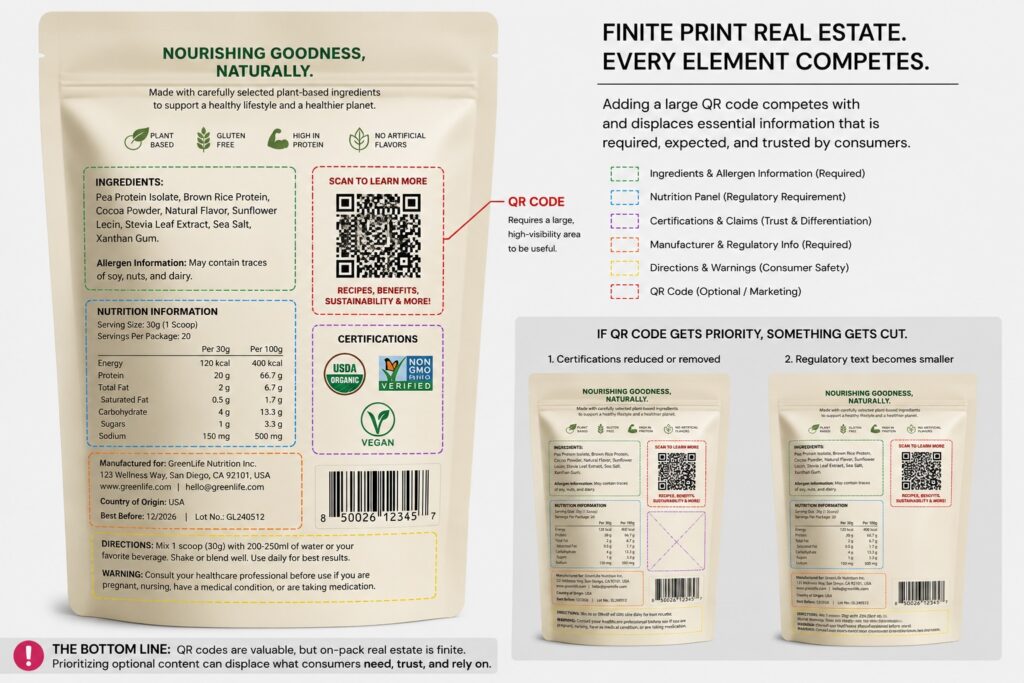
Technical Requirements That Determine Whether It Scans
Beyond the quiet zone minimum, a few technical factors determine whether a QR code on printed packaging actually works in the field.
Contrast is the most common failure point after size. A QR code requires sufficient contrast between the dark modules and the light background for a camera to resolve it. Black on white is the benchmark. Dark on dark — navy on black, dark brown on kraft, forest green on dark green — will fail in anything less than ideal lighting. If the brand colour palette is dark overall, the code needs its own light-coloured bounding box, which adds to the space it occupies on the dieline.
Print method matters too. QR codes printed on flexible packaging via digital print (HP Indigo) hold sharp edges and scan reliably at the minimum recommended size. Codes printed via flexo at very small sizes can suffer from dot gain — where ink spreads slightly during printing — which can corrupt the modules at the edges of the code. If the packaging is being produced via flexo and the code is small, test a physical proof before committing to the full run.
Finally, placement affects scan behaviour. A code on a flat panel — the back of a box, the front face of a pouch — is straightforward. A code on a curved or gusseted surface is harder to scan, because the camera has to resolve a distorted grid. Where possible, place codes on the flattest available surface and avoid seam or fold areas.
The Decision Framework
Run your situation against these rules before finalising the artwork:
- If the destination delivers something the physical packaging can’t (a recipe, a compliance document, a tutorial, a registration) AND the format has room for a minimum 2cm × 2cm quiet zone without displacing mandatory content → include the QR code.
- If the destination is a homepage, a social media page, or a generic product listing → don’t include the code; it won’t earn the scan and a failed scan damages brand credibility.
- If the packaging is a small format where the quiet zone would require removing or shrinking mandatory regulatory text, allergen warnings, or certification marks → don’t include the code; the compliance risk isn’t worth it.
- If the brand is likely to rebrand, migrate platforms, or change destination URLs within the life of the print run → use a dynamic code, not a static one, and factor $5–$50/month into the packaging budget.
- If the run volume is under 500 units and the destination is unproven → skip the code on this run; validate the destination through other channels first and add it on the next print.
The most common mistake is deciding to add a QR code and then working out the destination later. The destination has to justify the space before the code goes anywhere near the artwork. If you can’t answer “what does the customer get by scanning this, and why would they want it?” — the code isn’t ready.
Getting the Artwork Right Before You Print
If you’re working through your dieline and want to check whether a QR code fits without compromising mandatory content, that’s the right moment to flag it — before the artwork is locked, not after. Stand-up pouches and printed labels are the formats where this decision has the most impact, because the available print area is smallest relative to what has to fit on it.
If you’re thinking about how a QR code fits into a broader unboxing or customer experience strategy, it’s worth reading through what actually makes an unboxing experience worth the investment — the same logic about destination quality applies there.

Brad Holmes
Designer & Strategist, Packaging Studio
Brad Holmes is Designer and Strategist at Packaging Studio, with 20+ years’ experience developing creative and technical work for print. His background spans wide format, commercial print, direct-to-customer print, and packaging. His guides focus on the decisions that shape how packaging works in the real world, from presentation and usability to production requirements and customer experience.